

Type “draggan ai editing tool” into a search bar and you will find several websites that each present themselves as the tool. Two of the pages near the top say something odd about themselves if you scroll to the footer. One calls itself an unofficial blog that is not affiliated with the software. The other says the page was recovered with a website archive downloader. Neither fact is a scandal, but both tell you that the page you landed on is not where DragGAN lives.
This guide from The Vishal Media sorts out what is real, what you are allowed to do with it, what it can and cannot edit, and how to try it without handing a stranger your photos.
Where the DragGAN AI editing tool really comes from
The name is written DragGAN, with two Gs and a capital GAN at the end, though plenty of people type it as “dragan ai editing tool” or “dragan ai”. Those searches lead to the same tool. DragGAN is the nickname of a paper called “Drag Your GAN: Interactive Point-based Manipulation on the Generative Image Manifold”. It appeared in the ACM SIGGRAPH 2023 conference proceedings, and you can find it in the ACM Digital Library. The author list is Xingang Pan, Ayush Tewari, Thomas Leimkühler, Lingjie Liu, Abhimitra Meka and Christian Theobalt.
According to the official project page, four of the six authors list the Max Planck Institute for Informatics. One lists MIT and one lists Google AR/VR. That is why you will see the tool described as “Google’s AI editor” in some articles. It is a loose label, because the work is mostly from a German research institute, with one Google researcher among the authors.
The official code lives in the XingangPan/DragGAN repository on GitHub. The project page links the paper, that code and a set of demo videos. It does not offer an interactive demo of its own, a paid plan or an installer.
How a drag edit works, in plain words
A GAN, short for generative adversarial network, is a type of AI model that learns to generate realistic images. DragGAN works on top of one. You mark a handle point on the image, such as the tip of a dog’s nose, and a target point, such as a spot further left. The tool then repeats two moves until the handle reaches the target.
The first move is called motion supervision. It nudges the image’s internal features near the handle toward the target. The second is point tracking, which uses the model’s own features to find where the handle point has ended up after the nudge, so the next round starts from the right place.
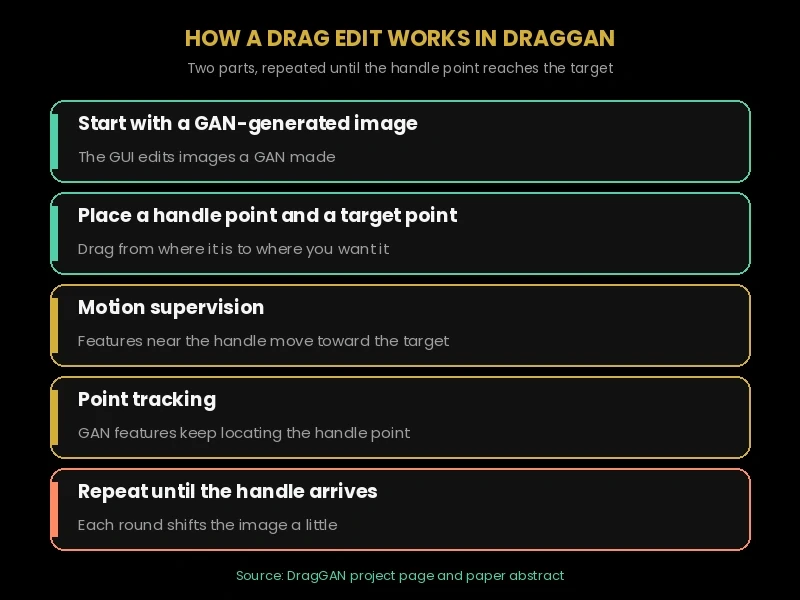
Because the edit happens inside the model’s learned image space, the result tends to stay realistic even when the tool has to invent parts of the picture that were hidden, such as the far side of a turned head. The project page lists pose, shape, expression and layout as the things you can change, with examples on animals, cars, humans and landscapes.
Five checks before you trust any DragGAN website
You will not always remember which site is which, so use a short test on any page that claims to be the tool. A genuine source should pass all five.
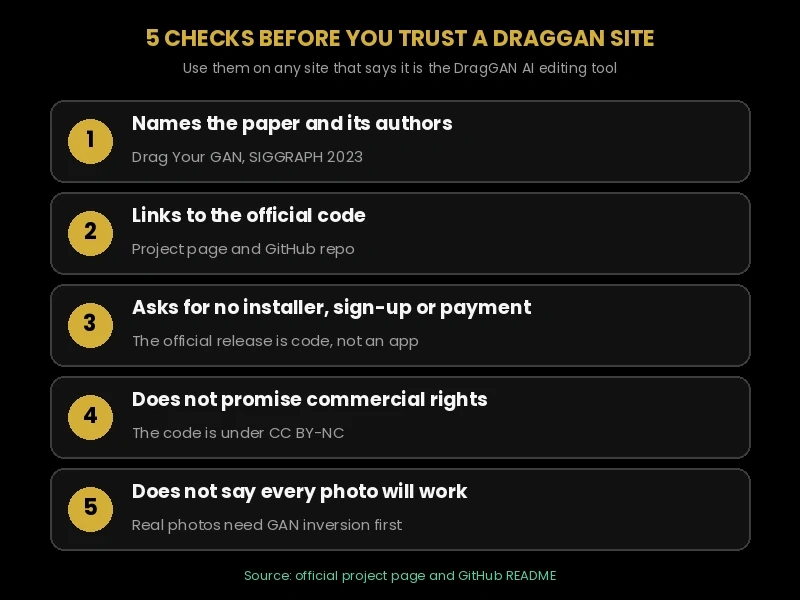
- It names the paper and its authors. A page that talks about DragGAN without ever saying “Drag Your GAN” or naming the researchers is repeating what other pages said.
- It links to the official code. The GitHub repository and the Max Planck project page should be easy to find.
- It does not ask you to install a program, sign up or pay. The official release is research code. A “free demo for Windows” on a download directory, for example, does not say who built the file, which version it is or what licence applies.
- It does not promise commercial rights. One popular copy has a heading about editing photos “with commercial rights” and gives no terms. The code’s licence says otherwise, as the next section explains.
- It does not say every photo will work. The official GUI has a narrower job, which we get to below.
One more detail is worth knowing. A widely read explainer sends its readers to one of the unofficial sites as “the DragGAN website”. Popularity does not make a page official, so check the page against the five points, not against how many people link to it.
What the licence lets you do
The README states that the DragGAN algorithm code uses the CC BY-NC licence, where NC means non-commercial. Parts that were copied or changed from StyleGAN3 fall under the NVIDIA Source Code License instead. The README also says that anything you build on it must keep the watermarking feature that marks output as “AI Generated”.
In everyday terms, learning, research and personal experiments fit the licence. Selling edited images, using the tool inside a client project or building a paid service on the code does not. If any of that is your plan, read the licence text yourself and ask a qualified person. This article is not legal advice.
What it can edit, and what it cannot
This is the part most pages skip. According to the README, the GUI supports editing images that a GAN generated. To edit a real photograph you first run it through GAN inversion, which means finding the model setting that recreates your photo, using a tool such as PTI. Then you load the resulting values and model weights into the GUI.
So the promise of “upload any photo and drag” is not how the official tool works. The examples on the project page cover animals, cars, humans and landscapes, which is a sensible expectation for what to try. The project page states no limitations or failure cases. It does not publish speed numbers either, so be sceptical of any page that quotes “edits in seconds” without saying on what hardware.
Hardware is another place where numbers float around without a source. One guide says you need one to eight high-end NVIDIA graphics cards with at least 12 GB of memory. The README gives no memory figure. It says that if you have a CUDA graphics card you should follow the StyleGAN3 requirements, and it adds separate notes for machines without NVIDIA hardware and for Macs. Its Docker route needs about 25 GB of disk space.
Three ways to try it, safest first
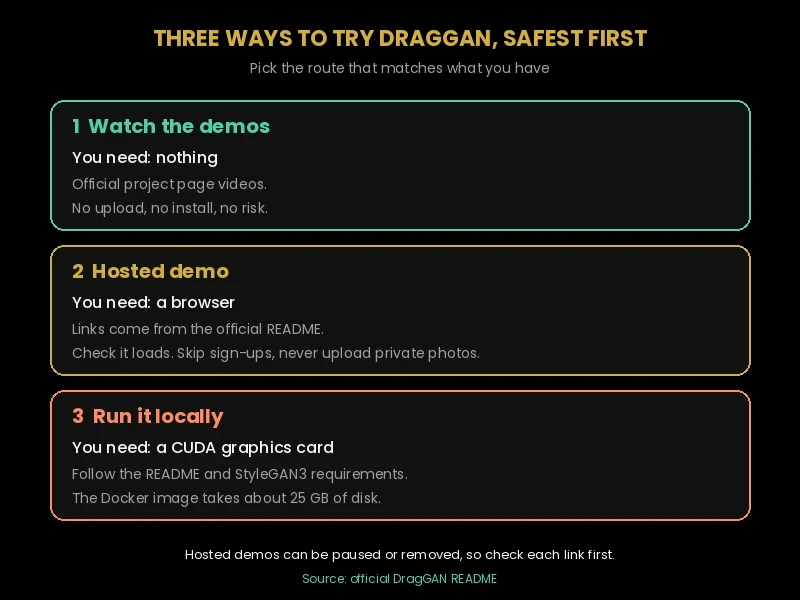
1. Watch the demo videos. The project page has clips for a lion, cat, dog, horse, elephant, face, human, car and landscapes. You upload nothing and install nothing, and it is enough to decide whether the idea interests you.
2. Use a hosted demo from the official README. The README lists an OpenXLab app, a Hugging Face Space and a Google Colab notebook. We have not tested them for this article, and community demos can be paused or removed, so open the link from the GitHub page and see whether it still loads. Skip anything that asks for sign-up or payment. Do not upload private photos or pictures of other people to a third-party host.
3. Run it on your own computer. This keeps your images on your machine, which is a point in its favour, much like the idea behind on-device AI that we explain in our guide to edge AI and how it works. The trade-off is setup effort and a suitable graphics card. These commands come from the README as it stood in November 2026, so check the repository for changes before you copy them:
conda env create -f environment.yml
conda activate stylegan3
pip install -r requirements.txt
python scripts/download_model.py
python visualizer_drag_gradio.py
The README also gives sh scripts/gui.sh for Linux and .\scripts\gui.bat for Windows if you prefer the desktop interface. For your first try, put the handle and target points close together. A small move is easier to judge than a large one, and it tells you whether your setup works before you spend time on a bigger edit.
Which route fits you
| Your situation | Sensible route | Watch out for |
|---|---|---|
| You are curious and want to see what it does | Demo videos on the project page | Nothing to install or upload |
| You want to drag points on a face or animal a GAN made | Hosted demo from the official README | Link may be paused. No private photos |
| You have an NVIDIA graphics card and some patience | Local install from the README | Setup time, disk space, CC BY-NC licence |
| You need edited images for paid or client work | Not the DragGAN code | The non-commercial licence |
| You want to edit your own real photo | Local install plus GAN inversion first | Extra steps before the GUI helps |
Drag-editing research after DragGAN
DragGAN started a small family of drag-based editing research. Three papers worth reading are DragDiffusion, which applies diffusion models to point-based editing, FreeDrag, presented at CVPR 2024, and Inpaint4Drag, presented at ICCV 2025. We list them as further reading and have not tested them, so check each project’s own licence and requirements before you plan to use one.
Use it responsibly
A tool that moves a person’s face or body in a realistic way can be misused to make misleading images. Edit only pictures you have the right to edit, do not alter real people’s photos without their consent, and keep the “AI Generated” mark the code adds. If you share results, say that they are AI edits. For more on how AI systems work in general, our explainer on artificial intelligence is a good place to start.
Frequently asked questions
Is DragGAN free?
The official code on GitHub is free to download and use for non-commercial purposes under CC BY-NC. Free to download does not mean free to use commercially. The official project page lists no paid plan, so a site that charges for “DragGAN” access is not selling the research release.
Is there an official DragGAN app?
The official project page links the paper, the code and demo videos. It does not list a mobile app or a Windows installer. Treat any app or file that carries the name with caution until you can trace it to the official repository.
Can DragGAN edit my own photos?
Yes, with extra work. The GUI edits GAN-generated images, so a real photo has to go through GAN inversion first, for example with PTI, and its values and weights are then loaded into the GUI.
Did Google make DragGAN?
Mostly no. Of the six authors, one lists Google AR/VR. Four list the Max Planck Institute for Informatics and one lists MIT.
Can I use DragGAN edits in my business?
The code is under CC BY-NC, which excludes commercial use, and the README requires the “AI Generated” watermark to stay. For business use, read the licence and get advice from a qualified person.
What to do next
Start with the demo videos on the official project page, then look at the GitHub repository before you download anything else that carries the name. If you found a DragGAN site that fails the five checks, or a link in this guide that no longer works, tell us through the contact form and we will update the article. For more plain-language guides, browse the Technology section of The Vishal Media, and our comparison of edge AI vs cloud AI explains the hosted versus local trade-off in more detail.
Disclaimer
This article is for general information only and is not legal, licensing or technical advice. We did not run DragGAN for this guide and relied on the project’s official page, its GitHub README and the published paper listing as of November 2026. Links, hosted demos and licence terms can change, so confirm them at the source before you rely on them. Read our full disclaimer.