
Search for I Square - Lenovo EX and you will find blogs calling it a smart classroom partnership, a “solution ecosystem,” or a sleek new laptop with an 8 to 10 hour battery. None of that is accurate. I Square - Lenovo EX is a shop: the Lenovo Exclusive Store on S P Verma Road in Patna, listed on Lenovo’s own website as “LES ~ S P Verma Road - I Square.”
At The Vishal Media, we went straight to Lenovo’s official store listing and cross-checked it with other public business records, following our editorial policy of sticking to what can be verified. This guide covers what you actually need before visiting this Lenovo store in Patna: where it is, what it sells, how the offers work, and what to check after you buy.
What “I Square - Lenovo EX” Actually Means
The name is shorthand, and once you break it down, the confusion disappears.
-
LES stands for Lenovo Exclusive Store, Lenovo’s own retail format run with a local partner.
-
EX is short for Exclusive.
-
I Square is the name of this particular store.
An exclusive store is an authorised Lenovo retailer that sells only one brand. Walk in asking for an HP or Dell and you will leave empty-handed. The upside is depth: you see most of Lenovo’s current range in one room, from budget IdeaPads to Legion gaming machines, and you get access to brand-run promotions that multi-brand shops often do not carry.
Store Snapshot at a Glance
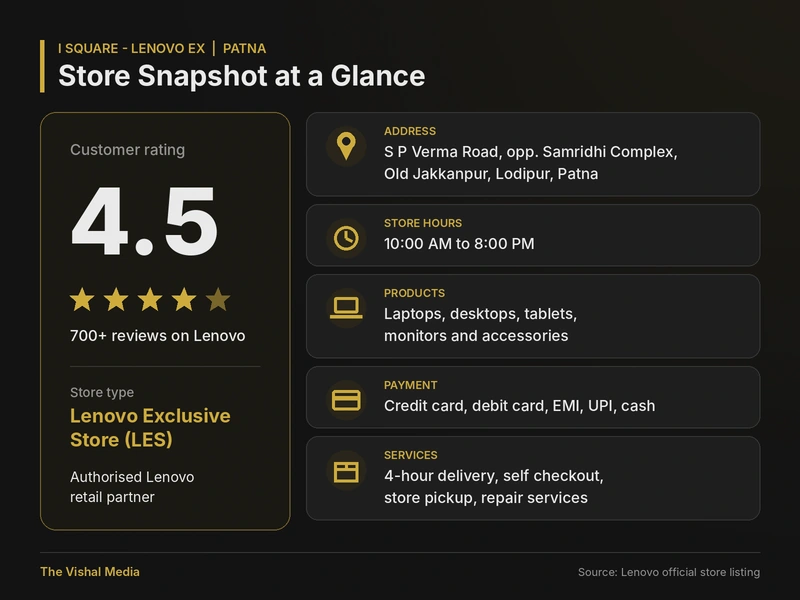
Here is everything about I Square - Lenovo EX in one place, so you do not have to jump between listings.
| Detail | Information |
|---|---|
| Official name | LES ~ S P Verma Road - I Square |
| Address | S P Verma Road, opposite Samridhi Complex, Old Jakkanpur, Lodipur, Patna, Bihar |
| Store hours | 10:00 AM to 8:00 PM |
| Rating | 4.5 stars from 700+ reviews (Lenovo listing) |
| Products | Laptops, desktops, tablets, monitors, accessories |
| Services | 4-hour delivery, self checkout, store pickup, repair services |
| Payment | Credit card, debit card, EMI, UPI, cash |
| Location link | Open in Google Maps |
For the latest phone number and stock availability at this Lenovo store S P Verma Road branch, use the store’s official Lenovo listing or the Google Maps link above. Store numbers change more often than addresses, so these two sources stay the most reliable.
Finding the Store on S P Verma Road
If you are new to Patna, here is something useful: S P Verma Road is effectively the city’s laptop street and the busiest stretch of the Patna laptop market. ASUS runs several exclusive stores along it, Acer opened its first Patna exclusive store here, and Lenovo itself picked this road for its first Patna smart devices store, describing the area as the city’s IT hub.
That clustering works in your favour. You can compare a Lenovo IdeaPad at the Lenovo Exclusive Store Patna branch, check a similar ASUS Vivobook a few buildings away, and make a decision the same afternoon without crossing the city.
Landmark to remember: the store sits opposite Samridhi Complex in Old Jakkanpur. If you search Maps for Lenovo store Jakkanpur, this is the pin you want. Share that pin with your auto or cab driver rather than relying on the store name alone, since several brand stores share this stretch.
Visiting tip: weekends and admission season bring the biggest crowds to electronics stores. If you want unhurried time with demo units and staff, a weekday morning soon after opening is the safer bet.
What to Buy at I Square, Matched to the Buyer
Lenovo’s catalogue is huge, and walking in without a shortlist is how people overspend. Here is how the main series map to real buyers, with Lenovo laptop price in India bands based on current Lenovo India listings and major online stores.
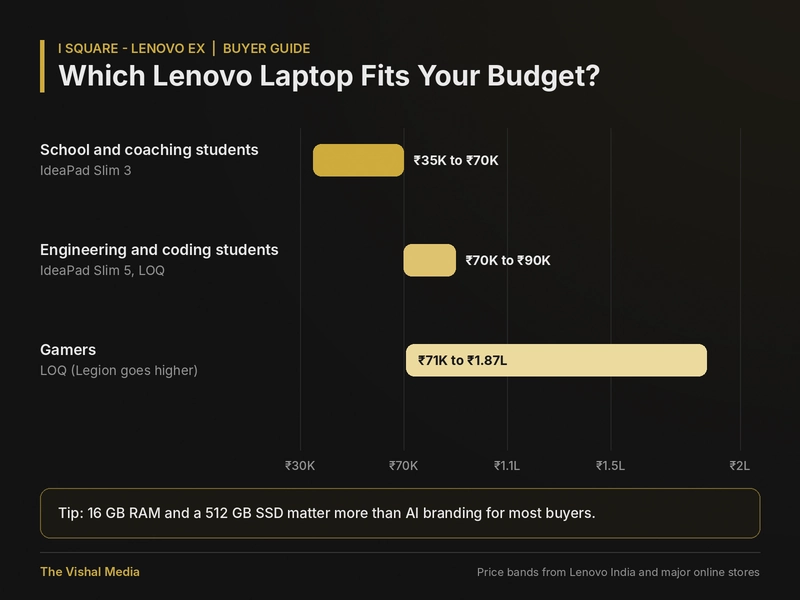
| Buyer | Best-fit series | Typical price band | Why it fits |
|---|---|---|---|
| School students, coaching aspirants | IdeaPad Slim 3 | Around ₹35,000 to ₹70,000 | Light, reliable, handles lectures, notes, browsing and Office |
| Engineering and coding students | IdeaPad Slim 5, LOQ | Around ₹70,000 to ₹90,000 | More RAM and stronger CPUs for compiling, CAD and multitasking |
| Gamers | LOQ, Legion | LOQ from about ₹71,000; RTX 5060 configs near ₹1.8 lakh | Dedicated NVIDIA GPUs and high refresh rate screens |
| Creators and premium users | Yoga | Upper mid-range to premium | Better displays, slimmer builds, often OLED options |
| Office and small business | ThinkPad, ThinkBook | Mid-range to premium | Durable keyboards, business-grade security and support |
Real example: when people ask us for the best laptop for students, the answer depends on the course. A NEET aspirant in Patna who mostly streams coaching lectures and makes PDF notes does not need a gaming laptop GPU. An IdeaPad Slim 3 with 16 GB RAM covers that comfortably and leaves budget for a good headset. An engineering student who will run MATLAB, Android Studio or AutoCAD should not go below 16 GB RAM, and a LOQ with a dedicated GPU starts making sense.
One pricing note worth knowing: RAM and SSD costs have been climbing this year because of AI-driven chip demand, and higher-RAM configurations have felt it most. If a 16 GB model looks pricier than what a friend paid last year, that is the reason, not the store.
Do You Need an “AI PC”?
You will see AI PC labels on newer models, such as the Snapdragon-powered IdeaPad Slim 5x. These laptops include an NPU, a chip built to run AI features locally instead of sending data to a server. If you want to understand why that matters, our guide to on-device AI explains it in plain terms, and the comparison of edge AI vs cloud AI shows where each approach wins.
Practical advice from a developer’s point of view: an NPU is a bonus, not a must. For most students and office users, 16 GB RAM and a 512 GB SSD will change daily experience far more than AI branding.
Services and Payment Options at the Store
Lenovo’s listing for I Square shows four services that set this Lenovo laptop store in Patna apart from a regular electronics counter:
-
4-hour delivery, useful if you buy online and want the unit from a nearby store.
-
Self checkout for quick purchases.
-
Pickup from store, so you can order on Lenovo’s site and collect in person.
-
Repair services for Lenovo devices.
Payment is flexible: credit cards, debit cards, EMI, UPI and cash are all accepted. Lenovo also advertises a free bag on every PC purchase at its exclusive stores, along with rotating cashback offers.
Repair vs warranty claim: these are not always the same thing. The store can help with repairs, but warranty claims run through Lenovo’s official support system and the nearest Lenovo service center in Patna. Before visiting with a faulty device, do a quick Lenovo warranty check on Lenovo’s warranty lookup page and ask the staff whether your issue is handled in-store or routed to an authorised service centre.
Lenovo Offers at I Square, Decoded
Offers are where most buyers either save real money or get confused. Here is how each one works in practice.
Exchange Offer
The Lenovo exchange offer is simple on paper. Bring your old laptop with its charger. The exchange value depends on age, condition and whether it powers on properly. A five-year-old laptop with a cracked hinge will fetch far less than a three-year-old one in clean condition. Get the exchange value in writing before you finalise the new model, so the discount does not shrink at billing.
Student Offer
Lenovo promotes a Lenovo student discount at its exclusive stores, and online it runs an Education Store where college students verify through SheerID to unlock extra discounts. Carry your college ID card and, if you have one, your institutional email login. Then ask a simple question at the counter: “Does your in-store student price beat the Lenovo student deals page?” Sometimes it does, sometimes online wins.
EMI Options
When you choose a Lenovo laptop EMI plan, no-cost EMI means the interest is absorbed through a discount, but banks may still add a processing fee. On a ₹60,000 laptop split over six months, the EMI is ₹10,000 a month, yet the total you pay can be slightly higher once fees are included. Ask for the total payable amount, not just the monthly figure.
Offers at Lenovo stores rotate through the year, so treat any offer you read online, including this guide, as a starting point and confirm the current version with the store.
I Square Store vs Online: Which One Wins for You?
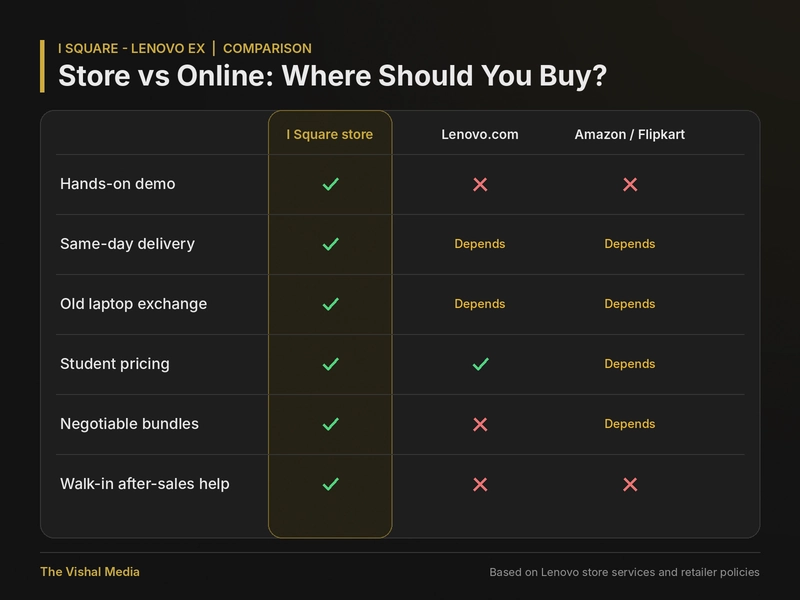
| Factor | I Square store | Lenovo.com | Amazon / Flipkart |
|---|---|---|---|
| Hands-on demo | Yes | No | No |
| Delivery speed | Same day if in stock | Few days | Fast in big cities |
| Exchange of old laptop | Yes, assessed in person | Limited | Program-based |
| Student pricing | In-store offers | Education Store with verification | Occasional bank or sale offers |
| Bundles (bag, accessories) | Often negotiable | Fixed | Seller-dependent |
| After-sales help | Walk-in support | Online and phone | Through Lenovo support |
Verdict: buy at the Lenovo showroom in Patna if you want to feel the keyboard, compare screens side by side, exchange an old device, or need the laptop today. Buy online if you already know the exact model and a sale price is clearly lower. Many smart buyers do both: shortlist in the store, compare the price online, then decide.
Your Pre-Visit Checklist
Five minutes of preparation can save you a second trip.
-
Budget and use case decided. Know your upper limit and the two or three tasks the laptop must handle.
-
ID proof for billing and EMI paperwork.
-
College ID if you want student pricing.
-
Old laptop and charger if you plan to exchange.
-
Credit or debit card if you want card EMI.
-
Questions to ask: warranty length, extended warranty or accidental damage cover, whether Windows and MS Office are pre-activated, and what the total price includes.
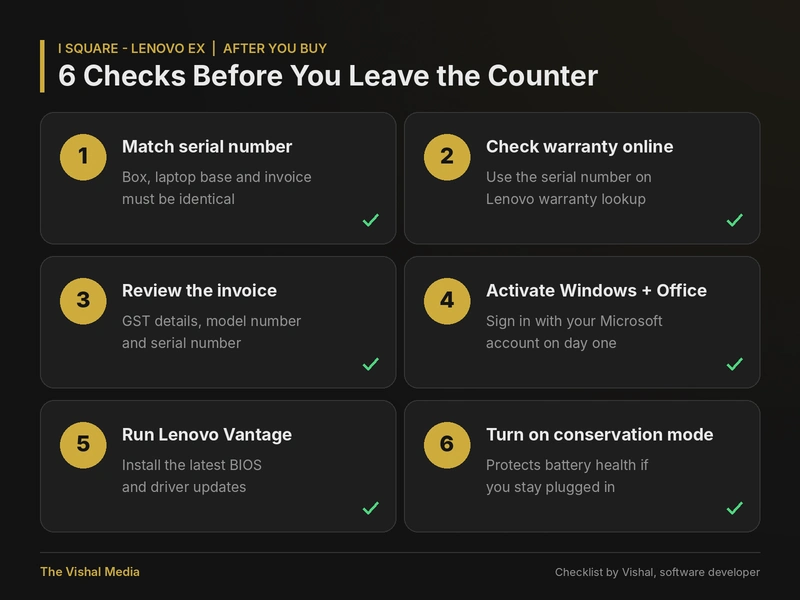
After the Purchase: Verify, Activate, Protect
This is the step most buyers skip, and it is where problems hide.
-
Match the serial number on the box, the laptop’s underside and the invoice. All three should be identical.
-
Check the warranty online using the serial number on Lenovo’s warranty lookup page. It should show your purchase-linked coverage.
-
Review the invoice for GST details, the model number and the serial number.
-
Activate Windows and MS Office on day one. If Office is bundled, sign in with your Microsoft account so the licence stays tied to you.
-
Run Lenovo Vantage updates to get the latest BIOS and drivers.
-
Turn on battery conservation mode in Lenovo Vantage if the laptop will stay plugged in most of the day. It limits the charge level and helps the battery last longer.
A tip from years of setting up development machines: create a system restore point right after setup and uninstall any trial software you will not use. A clean start keeps the laptop faster for longer.
What Buyers Say About I Square - Lenovo EX
Reviews on Lenovo’s listing lean strongly positive. The recurring themes are helpful counselling before purchase, polite and patient staff, and confidence in getting genuine products. Several buyers specifically mention being guided to the right model rather than pushed toward the most expensive one.
Keep perspective, though. Reviews describe individual experiences on particular days. Use them as a signal of how the store generally treats customers, and still apply the checklist above to your own purchase.
Frequently Asked Questions
Is I Square - Lenovo EX a laptop model?
No. It is the name of a Lenovo Exclusive Store on S P Verma Road in Patna. Lenovo does not sell any laptop called “Lenovo EX.”
Where is the I Square Lenovo store in Patna?
I Square Lenovo Patna is on S P Verma Road, opposite Samridhi Complex, in the Old Jakkanpur and Lodipur area of Patna, Bihar.
What are the I Square Lenovo store timings?
Lenovo’s listing shows 10 AM to 8 PM. Hours can differ on public holidays, so call ahead or check Google Maps before a long trip.
Does the Lenovo Exclusive Store in Patna offer EMI?
Yes. EMI is listed as a payment option alongside cards, UPI and cash. Ask for the total payable amount, including any processing fee, before signing.
Can I exchange my old laptop at I Square?
The Lenovo exchange offer is promoted at Lenovo Exclusive Stores. The value depends on your device’s age and condition, so bring the laptop and charger for an in-person assessment.
Is there a student discount at the Lenovo store?
Lenovo runs a Lenovo student discount in stores and through its online Education Store. Carry a valid college ID and compare the in-store price with the online student price.
Can I get my Lenovo laptop repaired here?
Repair services are listed for this store. For warranty claims, do a Lenovo warranty check on Lenovo’s warranty lookup page first and confirm with the staff where the claim will be processed.
Is buying from a Lenovo Exclusive Store cheaper than Amazon?
Not always. Online sales can undercut store prices on specific models, while stores can add value through exchange, bundled accessories and same-day pickup. Compare the final price, not just the sticker.
Kya I Square Lenovo store par laptop ka live demo milta hai?
Haan. Store mein demo units rakhe jaate hain, jahan aap keyboard, screen brightness aur laptop ka weight khud check kar sakte hain. Online kharidne se pehle bhi ek baar demo dekhna faydemand rehta hai, khaaskar agar aap pehli baar laptop le rahe hain.
Kya main Lenovo website se order karke I Square store se pickup kar sakta hoon?
Haan. Lenovo ki listing mein Pickup from Store service di gayi hai. Order karte waqt apna pincode daalein aur pickup option mein yeh store chunein. Collect karte waqt order details aur ID saath rakhein.
I Square Lenovo ki 4-hour delivery kya hoti hai?
Yeh ek fast delivery service hai jismein nearby store se product kuch ghanton mein aapke ghar tak bheja jata hai. Yeh stock aur aapke area par depend karta hai, isliye order se pehle availability confirm kar lein.
Kya Lenovo Exclusive Store Patna mein cash ya UPI se payment ho sakti hai?
Haan. Store cash, UPI, credit card aur debit card sab accept karta hai. Badi amount ke liye card ya UPI behtar hai, kyunki transaction ka record turant mil jaata hai aur bank offers ka fayda bhi mil sakta hai.
Laptop kharidne par free bag milta hai kya?
Lenovo apne exclusive stores par har PC purchase ke saath free bag advertise karta hai. Billing se pehle staff se confirm kar lein ki aapke model par yeh offer abhi chal raha hai ya nahi.
Planning Your Visit to I Square - Lenovo EX?
Here is your three-step game plan:
-
Shortlist two models from the buyer table above, based on your budget and daily tasks.
-
Check the store hours and location on the official Lenovo listing before you leave home.
-
Carry the pre-visit checklist so the exchange, student price and EMI conversations go smoothly.
Tap Save on this article so the checklist is on your phone at the counter. And if you are still deciding which specs really matter, browse more technology guides on The Vishal Media, written in plain language, without hype.
Disclaimer
The Vishal Media is an independent blog and is not affiliated with Lenovo or the I Square store. Store details, prices and offers in this article come from publicly available sources and can change at any time. Please confirm current information directly with the store before visiting or making a purchase. This article is for general information only. Read our full site disclaimer.