
A textile trader in Ludhiana prepares an e-way bill at 6 in the evening for a 420 km delivery. The portal suggests 420 km. His driver’s Google Maps says 480 km because of a diversion, so the trader types 480. The system refuses to accept it. Nothing is wrong with his internet or his GSTIN. He has simply crossed a limit that the pin to pin distance rules quietly enforce.
This guide from The Vishal Media is built for that moment. We’ll cover how to check the distance on the official portals, what each common error means and how to fix it, and how to work out validity in the tricky cases that trip up even experienced dispatch teams.
Pin to Pin Distance in One Minute
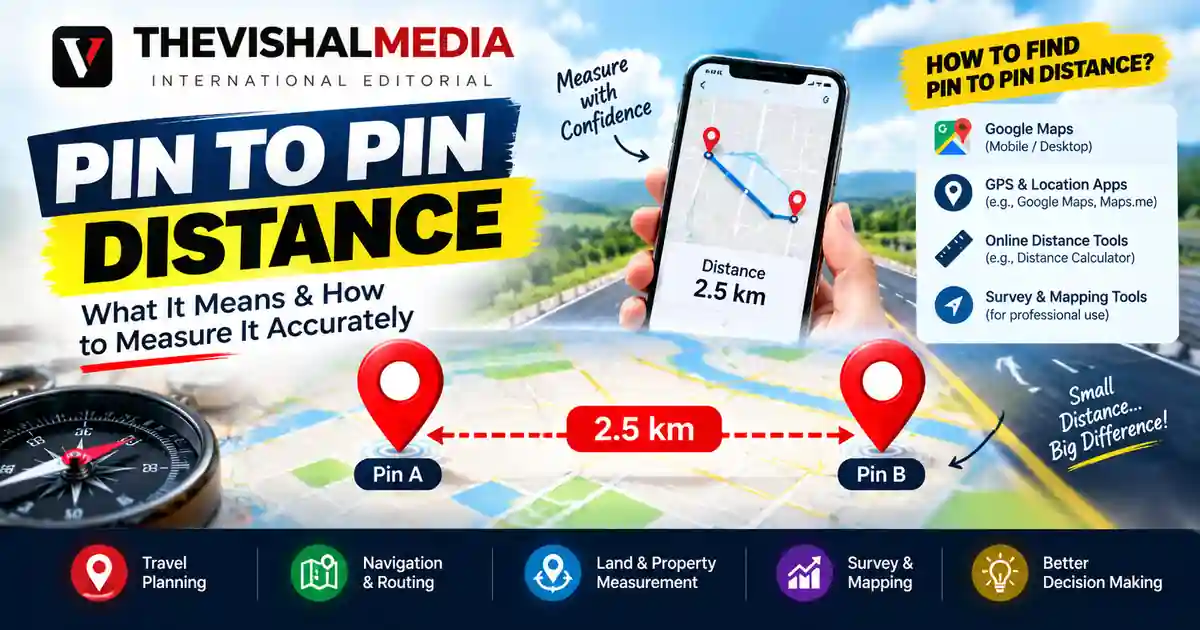
Pin to pin distance is the motorable road distance the e-way bill system estimates between the PIN code of the consignor, where goods leave from, and the PIN code of the consignee, where they’re delivered. It’s the official reference for e-way bill distance calculation. It’s not a straight line on a map, and it’s not the exact door-to-door distance either. It’s an approximation based on PIN code locations.
That number matters because it decides how long your e-way bill stays valid. Enter too little and the bill may expire before the truck arrives. Enter too much and the system blocks you.
Three numbers cover most situations:
| Rule | What it means |
|---|---|
| 10% allowance | You can enter up to 10% more than the system’s distance |
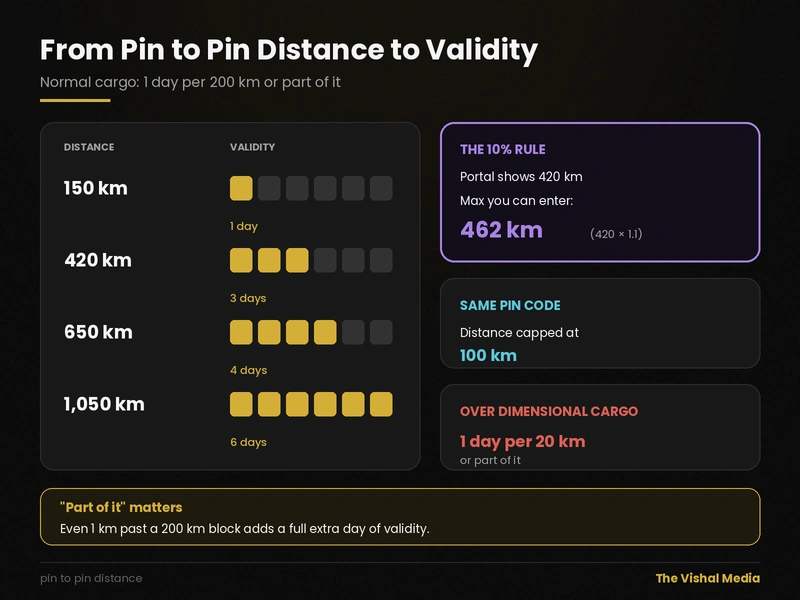
| 100 km same-PIN cap | If both PIN codes are identical, the distance can’t exceed 100 km |
| 200 km per day | Normal cargo gets one day of validity for every 200 km or part of it |
How to Check Pin to Pin Distance on the Official Portals
You don’t need any paid tool or login to check the distance. Two government portals offer it free.
On the e-way bill portal:
-
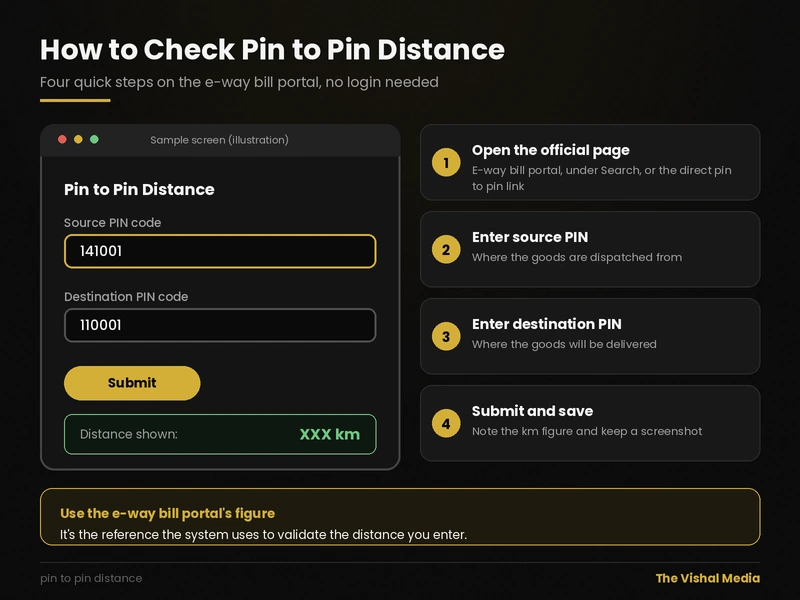
Open the official pin to pin distance page on the e-way bill portal. You can also reach it from the portal’s home page under the Search menu.
-
Enter the six-digit source PIN code, where the goods are dispatched from.
-
Enter the six-digit destination PIN code, where they’ll be delivered.
-
Submit and note the distance shown. This is the figure the e-way bill system uses as its reference when you generate the bill.
On the e-invoice portal:
The GST e-invoice portal has a similar PIN code distance search for businesses generating e-invoices. If you create e-way bills along with e-invoices, it’s worth checking there too.
Which one should you trust? For the e-way bill itself, use the e-way bill portal’s figure, because that’s the system that validates the distance you enter. Save a screenshot of the result before you dispatch high-value goods. If a dispute ever comes up, a dated screenshot of the official figure is far more useful than memory.
Common Pin to Pin Distance Errors and How to Fix Them
Most distance problems fall into five patterns. Here’s what each one means and what to do.
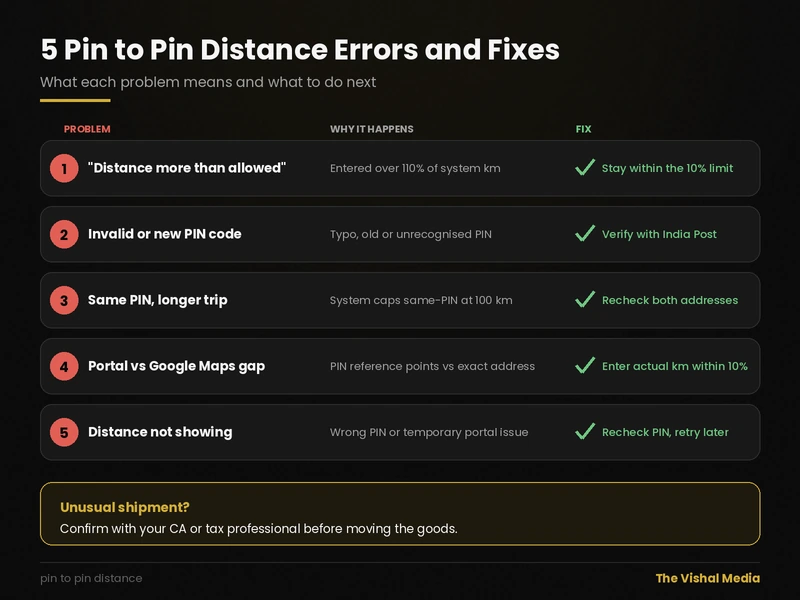
1. “Distance entered is more than allowed”
-
Why it happens: you entered more than 10% above the system’s estimated distance. In our Ludhiana example, the system showed 420 km, so the maximum allowed was 462 km. The driver’s 480 km crossed that line.
-
What to do: enter a figure within the limit. If the actual route is genuinely longer because of a diversion or closed road, keep a note or screenshot of the reason with your dispatch records.
2. Invalid or unrecognised PIN code
-
Why it happens: a typo, an old PIN code or a newly created PIN that the system doesn’t recognise.
-
What to do: check the PIN code on India Post’s official website or the buyer’s GST registration details. The system alerts you about an invalid PIN and lets you continue, but such e-way bills are flagged for review by the department, so it’s always better to correct it.
3. Same PIN code, but the real distance is longer
-
Why it happens: for a same pin code e-way bill, where the source and destination PIN codes match, the system caps the distance at 100 km.
-
What to do: double-check both addresses. A genuine movement of more than 100 km within one PIN code is rare, so a mismatch usually means one of the PIN codes is wrong.
4. Portal distance and Google Maps don’t match
-
Why it happens: the portal calculates between reference points for each PIN code, while Google Maps uses exact addresses and current routes. A difference of a few kilometres is normal.
-
What to do: if your actual route is longer, enter the real distance as long as it stays within the 10% allowance. If it’s shorter, you can enter the shorter actual distance, but remember that less distance means less validity.
5. Pin to pin distance not showing (zero or blank)
-
Why it happens: an invalid PIN code, a missing entry in the system or a temporary portal issue.
-
What to do: recheck both PIN codes, wait a few minutes and try again. If the issue continues, raise it with the e-way bill portal’s helpdesk before you generate the bill.
When in doubt about an unusual shipment, confirm with your CA or tax professional before moving the goods.
Working Out E-Way Bill Validity From the Distance
Once you have the distance, validity is simple arithmetic. Under CGST Rule 138(10), the validity period depends on the distance:
-
Normal cargo: one day for every 200 km or part of it.
-
Over dimensional cargo (ODC): one day for every 20 km or part of it.
“Part of it” matters. Even 1 km beyond a 200 km block adds a full extra day.
| Distance (normal cargo) | Validity |
|---|---|
| 150 km | 1 day |
| 420 km | 3 days |
| 650 km | 4 days |
| 1,050 km | 6 days |
When the clock starts and stops: validity is counted from the time the e-way bill is generated with vehicle details in Part B. Each “day” ends at midnight of the day immediately following. So a one-day bill doesn’t give you exactly 24 hours; it lasts until midnight of the next calendar day.
Tricky Real-World Cases (Worked Examples)
The formula is easy. Real shipments aren’t. These five cases come up again and again.
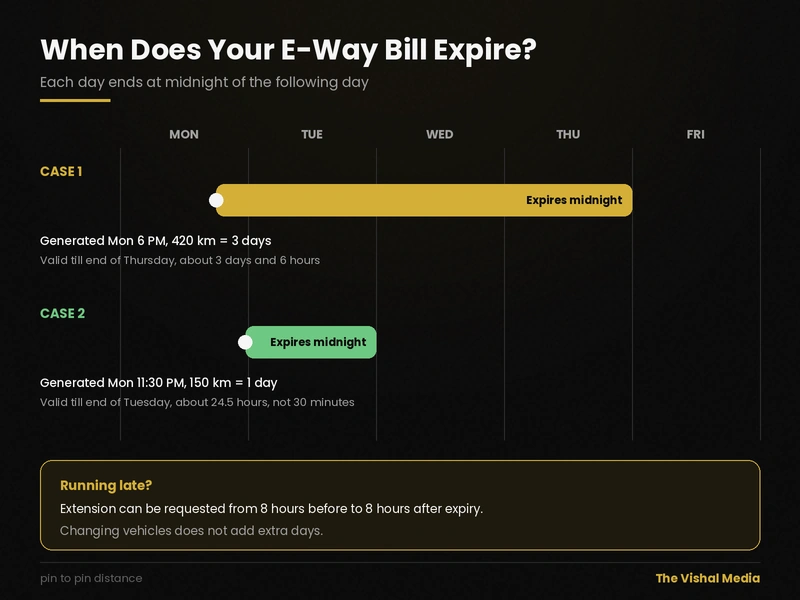
Case 1: A 420 km bill generated at 6 PM on Monday
420 km needs 3 days (200 + 200 + 20). Day one ends at midnight on Tuesday, day two at midnight on Wednesday and day three at midnight on Thursday. So the bill stays valid until the end of Thursday, which gives the truck roughly three and a quarter days.
Case 2: A 150 km bill generated at 11:30 PM
Many people assume a late-night bill “wastes” the first day. It doesn’t. Because each day ends at midnight of the day immediately following, a one-day bill generated at 11:30 PM on Monday stays valid until midnight on Tuesday. That’s about 24 and a half hours, not 30 minutes.
Case 3: The truck breaks down and you switch vehicles
Update the new vehicle number in Part B before the goods move to the new truck. Part A, which holds the invoice, GSTIN and address details, stays the same. Do it while the e-way bill is still valid. The supplier who generated the bill can do this, and so can the transporter if their ID was entered on the bill. Changing the vehicle doesn’t add extra days, so if the breakdown cost you time, you may also need an extension.
Case 4: Goods are shifted between vehicles mid-route (transshipment)
This works the same way as a vehicle change. Update Part B for each new vehicle before the shift. There’s no limit on how many times Part B can be updated for transshipment, and the portal keeps a history of every vehicle used.
Case 5: Validity is about to expire
The transporter can request an extension within 8 hours before or 8 hours after expiry, for genuine reasons such as a breakdown, accident or bad weather. Extensions are allowed up to 360 days from the original generation date. Don’t wait until the last hour; portal issues or network trouble on the road can make you miss the window.
When Distance Mistakes Become Costly
A wrong distance doesn’t just cause a portal error. It can create real trouble on the road.
-
Too little distance: the bill expires early. Goods moving on an expired e-way bill can be detained during checks, with possible penalties under the GST law.
-
Too much distance: the system usually blocks anything beyond the 10% limit. Even within the limit, consistently inflated distances and long validity periods can draw questions during audits.
-
Wrong PIN codes: flagged bills invite scrutiny, and a mismatch between the invoice address and the e-way bill can delay goods at a checkpoint.
The exact consequences depend on the facts of each case, so for anything beyond a simple correction, check the current provisions with a qualified tax professional.
A Quick Distance Checklist Before Every E-Way Bill
Pin this near your dispatch desk:
-
Have I verified both PIN codes against the invoice and buyer’s details?
-
Did I check the official pin to pin distance on the e-way bill portal?
-
Is my entered distance within 110% of the system’s figure?
-
Is this normal cargo or over dimensional cargo?
-
When will the bill expire, and can the trip realistically finish by then?
-
Is the vehicle number in Part B correct?
-
Does the driver have the e-way bill number or a printout?
-
Have I budgeted highway costs, including the latest toll rules for vehicles with and without FASTag?
Why the System Calculates Distance This Way
From a software developer’s point of view, the 10% allowance isn’t a loophole. It’s an honest admission of how the calculation works.
A PIN code isn’t a single point. It covers an area that can include dozens of villages or several city neighbourhoods. To calculate distance, a system has to pick one reference point for each PIN code and then measure the road route between those two points. Your warehouse might sit at one edge of its PIN area and your buyer at the far edge of theirs, so the real route can be a little longer or shorter than the estimate.
That’s why the e-way bill system gives you room to enter a higher figure, and why same-PIN movements get a fixed cap instead of a calculated distance. Here at The Vishal Media, we expect this to get more precise over time as finer location systems, such as India Post’s DIGIPIN, which divides the country into much smaller grid cells, become more widely used.
Frequently Asked Questions
Why is pin to pin distance not showing on the e-way bill portal?
The most common reasons are a mistyped or invalid PIN code, a new PIN code not yet in the system, or a temporary portal issue. Recheck both PIN codes, try again after a few minutes and contact the portal helpdesk if it still fails.
Can I enter more distance than the portal shows?
Yes, but only up to 10% more than the system’s estimate. If the portal shows 300 km, the highest figure it will accept is 330 km.
What distance should I enter if both PIN codes are the same?
Enter the actual distance, but it can’t exceed 100 km, because the system caps same-PIN movements at that figure.
How many days is an e-way bill valid for 500 km?
For normal cargo, 500 km gets 3 days of validity: two full 200 km blocks plus one more day for the remaining 100 km.
Can I change the distance after generating an e-way bill?
The portal doesn’t let you edit the distance on an existing bill. If the distance is wrong, the usual route is to cancel the bill within the allowed window, before the goods are verified in transit, and generate a new one. Check the current rules on the portal or with your CA before cancelling.
Is Google Maps distance accepted in an e-way bill?
You can use your actual route distance from Google Maps, but the system will accept it only if it falls within 10% above the portal’s estimated distance.
Make Every E-Way Bill Distance-Proof
Getting the distance right takes two minutes, while getting it wrong can hold a truck at a checkpoint for hours. Keep the checklist handy and check the official figure every time.
-
Save this guide so your dispatch team can refer to it before each shipment.
-
Share it with your accountant or logistics staff on WhatsApp.
-
Running a small business on digital tools? Our guide to easy technology shows how to pick simple, safe tools for everyday work.
-
Have another GST or e-way bill question? Send it to us and The Vishal Media may cover it next.
-
Explore more in our business guides.
Disclaimer
This guide is for general information only and is not tax or legal advice. GST and e-way bill rules can change, and their application depends on the facts of each shipment. For specific compliance questions, check the official GST portals or consult a qualified chartered accountant or tax professional.